
Your client left 12 comments. Some are fixes, some are praise, and two of them disagree. Flekh AI reads them all and drafts the tasks. You decide what gets made.
One comment
On any comment, click Make task. The task links back to the comment, the version and the moment.
All open comments at once
- Open the file.
- Open Flekh AI and click Make tasks from 12 open comments. The number is your count of open comments.
- Read the drafts. For each one you can edit the title or description, then pick Create this task or Don't create this task.
- Click Create.
Nothing is created until you click Create. Praise like "love this" is skipped. You see it under Skipped, no task needed.
When two comments disagree
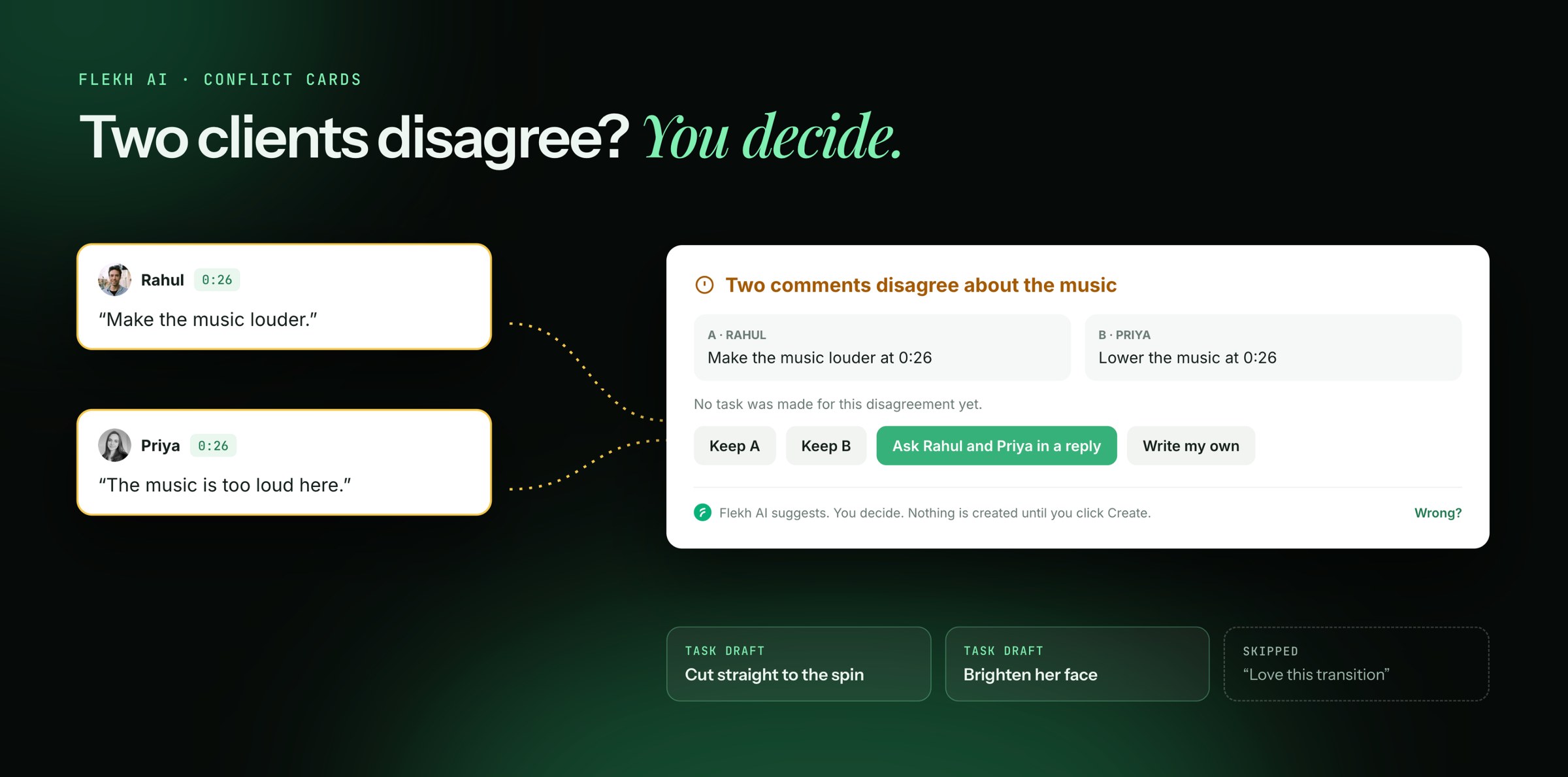
Say Rahul wrote "make the music louder" and Priya wrote "make it quieter". Flekh AI won't make two tasks that fight each other. It shows one card: Two comments disagree. You pick:
- Keep A or Keep B: make the task from one comment
- Ask Rahul and Priya in a reply: post a reply to them and let them settle it
- Write my own: you write the task yourself
Changed your mind? Click Undo.
Something wrong?
Every Flekh AI sentence has Wrong? next to it. Click it to tell me what it got wrong. It helps Flekh get better for you.